
Problem statement
Move every zero to the end of an integer array while keeping the nonzero values in their original order.
[0, 1, 0, 3, 12] becomes [1, 3, 12, 0, 0].
Constraints & requirements
- INPUT
- An integer array
- CHANGE
- Update the same array
- KEEP
- The order of nonzero values
Examples 3 test cases
Example 1 Mixed values
- Input
[0, 1, 0, 3, 12]- Output
[1, 3, 12, 0, 0]
Checks stable movement of nonzero values.
Example 2 All zeroes
- Input
[0, 0]- Output
[0, 0]
Checks an array with nothing to copy.
Example 3 No zeroes
- Input
[2, -1, 4]- Output
[2, -1, 4]
Confirms an already compact array is preserved.
Hints Optional
01Separate reading from writing
One position can inspect every value while another remembers where the next nonzero value belongs.
02Build the nonzero prefix first
Copy nonzero values from left to right. This naturally preserves their original order.
03Finish the remaining positions
After all nonzero values are copied, every position from the write index to the end should become zero.
How to think before coding
Separate the task into preserving the nonzero sequence and filling the unused suffix. Define write as the next free output position. Read each original position exactly once, copying only nonzeros to write. Once reading ends, every position before write is final; only then fill the suffix with zero. Swapping with arbitrary tail values would break the required stable order.
Brute force and the improvement
Collect nonzero values in a temporary list, copy them back, then fill zeros: O(n) time and O(n) extra space. Repeatedly shifting after each zero can take O(n²) time. Swapping each next nonzero with the write position also takes O(n) time and O(1) extra space while preserving nonzero order. Copy-then-fill separates the two jobs clearly.
Intuition
The write pointer marks the next position for a nonzero value. The read pointer scans the array. After copying every nonzero value forward, fill the remaining positions with zeroes.
Java solution
public static void moveZeroes(int[] values) {
    // No array was supplied, so there is nothing to change.
    if (values == null) {
        return;
    }

    int write = 0; // Next position where a nonzero value belongs.
    for (int value : values) {
        if (value != 0) {
            // Keep nonzero values in reading order; write never passes unread input.
            values[write] = value;
            write++;
        }
    }

    // Only the kept prefix matters now; fill the leftover suffix with zeros.
    while (write < values.length) {
        values[write] = 0;
        write++;
    }
}
Dry run
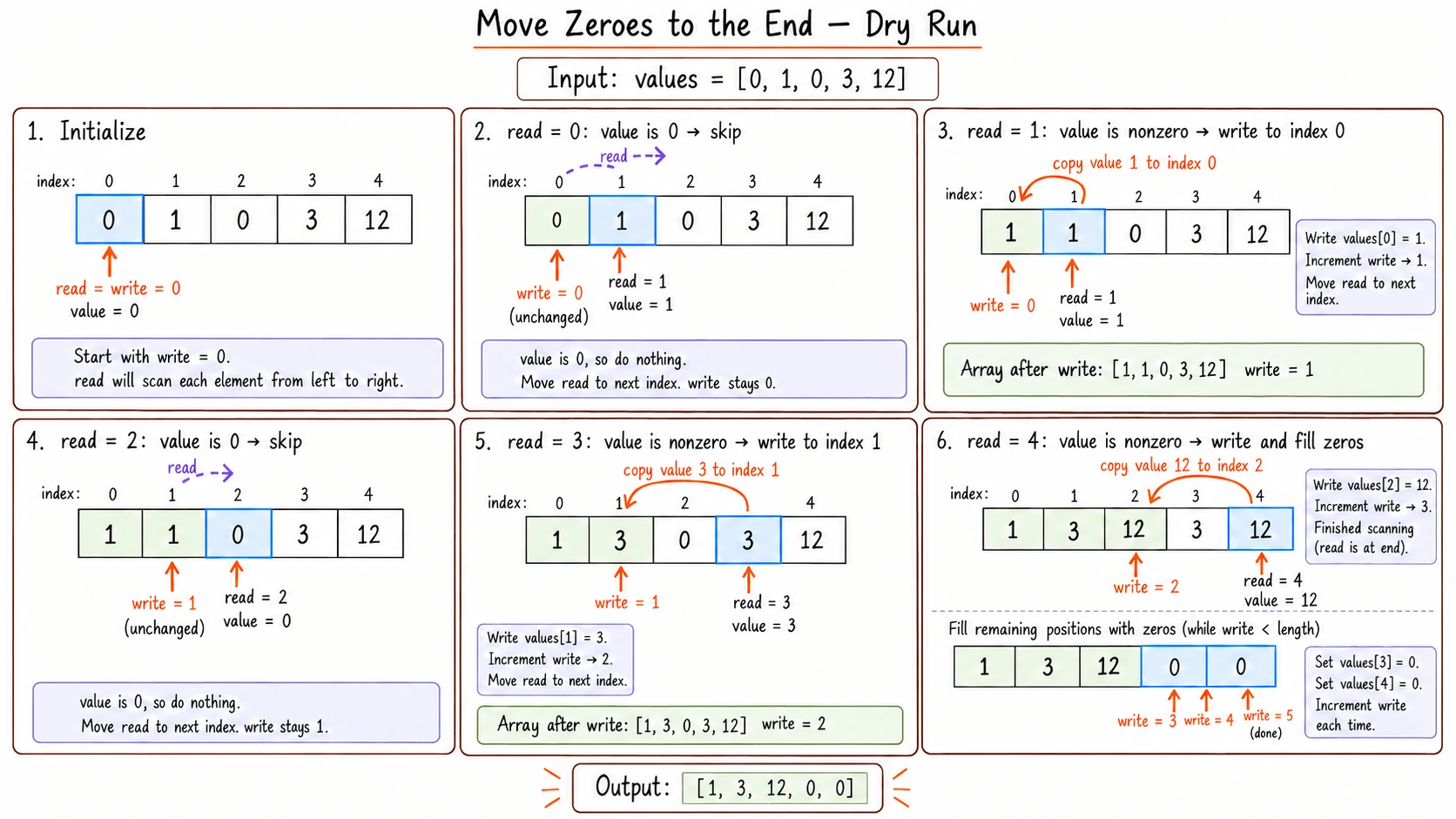
Read the text transcript
For [0, 1, 0, 3, 12], write marks the next slot for a nonzero value.
| Read index | Value | Action | Kept nonzero prefix |
|---|---|---|---|
| 0 | 0 | Skip | [] |
| 1 | 1 | Copy to index 0 | [1] |
| 2 | 0 | Skip | [1] |
| 3 | 3 | Copy to index 1 | [1, 3] |
| 4 | 12 | Copy to index 2 | [1, 3, 12] |
Fill indexes 3 and 4 with zero. Result: [1, 3, 12, 0, 0]. The nonzero values remain in their original order.
Why order is preserved
The read pointer sees nonzero values from left to right, and the write pointer places them in exactly that order.
Complexity
Time is O(n) and extra space is O(1).
Common mistake
Repeatedly shifting elements whenever a zero is found can take O(n²) time. Use a write position instead.
Practice next
Next lessonRemove Duplicates from a Sorted ArrayReuse separate read and write positions.